Simple API Integration
Simple API Integration
Simple API Integration is the fastest way to start issuing cards with Sparados.
In this model, the partner uses Sparados APIs to create card approvals and receive transaction history, while Sparados hosted web or mobile applications are used for user registration, card access, and authentication flows.
Simple API Integration is recommended for partners who want to launch quickly and use Sparados hosted end-user experience instead of building the full cardholder flow on their own.
Simple API Integration uses two main APIs:
| API | Purpose |
|---|---|
| Approval API | Used to create card approvals, assign cards to users, and define budgets, validity periods, and spending limits. |
| Transaction History API | Used to receive and process card transaction history. |
1. How Simple API Integration Works
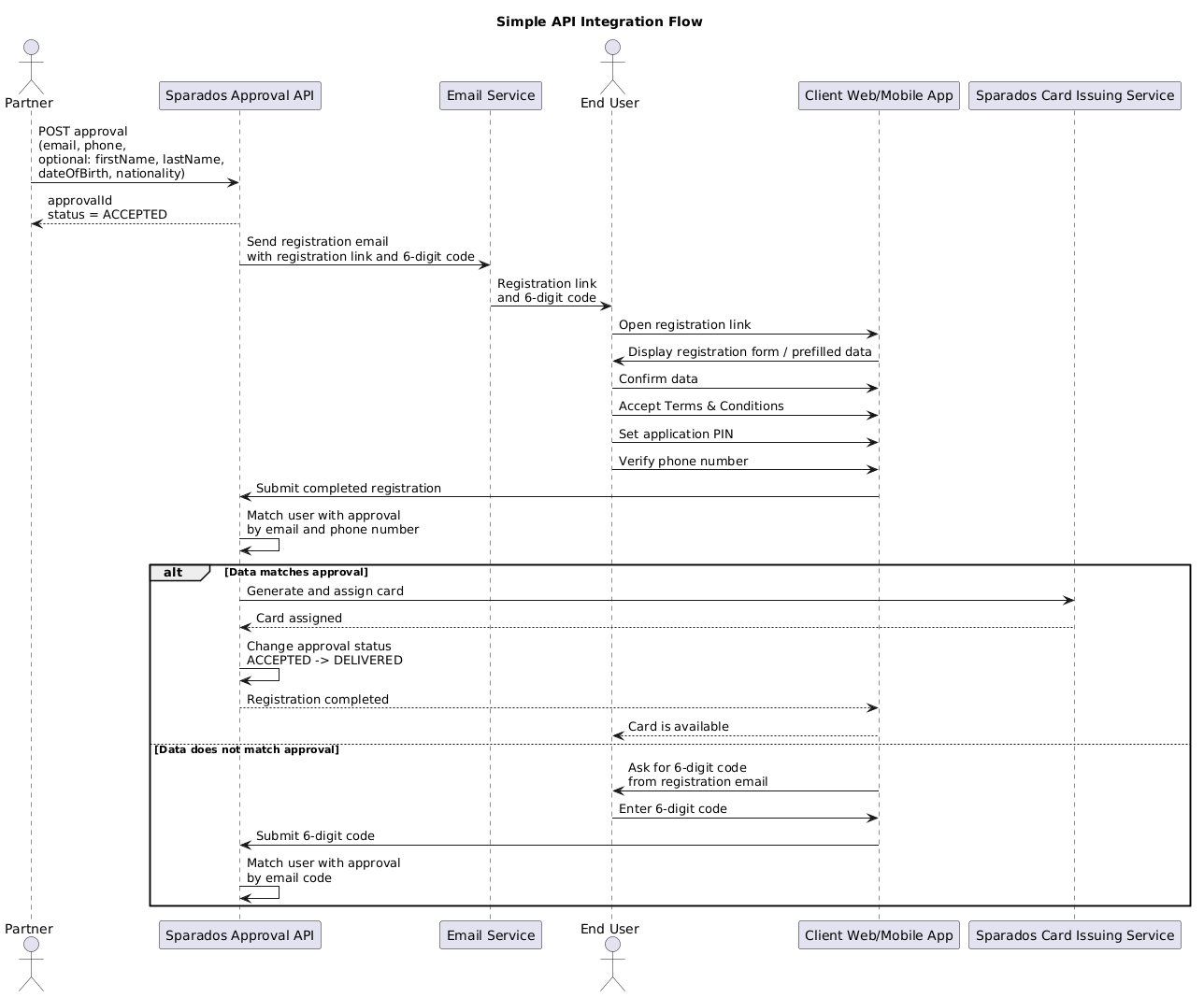
In the Simple API model, the partner starts by creating an approval for the end user using the Approval API.
The approval contains card assignment details, including the user’s email address and phone number. Optionally, the partner may also provide additional user details such as first name, last name, date of birth, and nationality.
After the approval is created, the end user receives an email with a registration link. Depending on the configured setup, the link directs the user to a Sparados hosted mobile or web application.
In the web application flow, the registration link may already contain the user data previously provided through the API.
The end user completes the registration process by:
- confirming their data
- accepting Terms and Conditions
- setting a PIN for the application
- verifying their phone number
After registration is completed, Sparados matches the user with the previously created approval using the email address and phone number.
If the data matches, the card is generated and assigned to the user automatically.
If the data does not match, the user can use the 6-digit code received in the registration email to complete the matching process.
Once the card is generated and assigned, the approval status changes from ACCEPTED to DELIVERED.
Simple API Flow Diagram
2. Values used in Sparados Cards API
Swagger documentation is in the end of document
This section describes common value formats used across Sparados Cards API.
These rules apply when creating approvals, defining card limits, setting validity periods, and managing card-related operations.
Date format
Sparados APIs use the ISO 8601 date and time format.
The expected format is:
YYYY-MM-DDTHH:mm:ss.SSSZWhere:
Tseparates the date from the timeZrepresents Zulu time / UTC time
Example:
2023-05-22T10:00:01.953ZMinor values
All numeric amount values used in Sparados Cards API are provided in minor units.
For example, to assign a card with a limit of 100.50 EUR, send:
10050This applies to values such as:
- card budget
- additional limits
- budget increases
- budget decreases
Currency
Card approvals are created in the currency of the account / balance. The currency does not need to be provided separately when creating an approval, because it is inherited from the selected account / balance.
Each account can have only one currency. Transactions may still be performed in other currencies, depending on the card configuration and transaction rules.
3. Creating Card Approvals
To assign a card to a corporation member, use the POST /secure/approvals endpoint.
A card approval defines who should receive the card, what budget can be used, how long the card should be valid, and what transaction limits should apply. After the approval is created, Sparados sends a registration email to the end user. When the user completes registration and the data matches the approval, the card is generated and assigned automatically. Remember to save the returned approvalId on your side. It will be required later when editing the approval, locking or unlocking the card, changing limits, increasing or decreasing the available budget, or unassigning the card.
Request Body Fields
Required and Optional Fields
Required fields are marked with *.
| Field | Required | Description |
|---|---|---|
balance.id |
Yes | Balance ID / Card Alias ID assigned to your corporation. This value can be copied from the Corporate Panel. |
user.id |
Conditional | Required if you assign the card to an existing user. If user.id is provided, user contact details such as email, prefix, and phone are not required. |
user.email |
Conditional | Required if user.id is not provided. Used for registration, communication, and matching the user with the approval. |
user.prefix |
Conditional | Required if user.id is not provided. Phone number prefix without +. Example: 48. |
user.phone |
Conditional | Required if user.id is not provided. User phone number used for authorization and matching. |
user.firstName |
No | User first name. Can be provided when creating approval for a new user / registration flow. |
user.lastName |
No | User last name. Can be provided when creating approval for a new user / registration flow. |
user.birthDate |
No | User date of birth in date-time format. Example: 1980-01-01T00:00:00.000+00:00. |
user.nationality |
No | User nationality in ISO country code format. Example: PL. |
rules.budgetMinor |
Yes | Total amount in minor units that the user can spend using the card. The amount is provided in the currency of the selected balance. |
rules.validityPeriod.startDate |
Yes | Start date and time of the card validity period in ISO 8601 format. |
rules.validityPeriod.endDate |
Yes | End date and time of the card validity period in ISO 8601 format. |
rules.validityPeriod.timezone |
Yes | Timezone used to adjust the card validity period to the exact local time. Example: Europe/Warsaw. |
rules.limits |
No | List of additional card limits. |
rules.limits.amountMinor |
Conditional | Required when a limit object is provided. Additional periodic limit amount in minor units. For MCC-based rules, this value may be set to 0. |
rules.limits.timeUnit |
Conditional | Required when a limit object is provided. Period for the additional limit. Available values: daily, weekly, monthly. |
rules.limits.type |
Conditional | Required when a limit object is provided. Available values include general, ecommerce, atm, foreign_amount, mcc_whitelist, mcc_blacklist. |
rules.limits.mccList |
Conditional | Required for MCC-based rules such as mcc_whitelist and mcc_blacklist. Contains the list of MCC codes used by the rule. MCC values may be provided as strings, e.g. "5812". |
rules.purpose.ecommerce |
Yes | Defines whether the card can be used for e-commerce transactions. Currently, this should be set to true. |
rules.purpose.allowChangeRequest |
No | Defines whether the user can request changes to card limits. true means the user can send a change request. false means change requests are disabled. |
card.description |
No | Description displayed on the card visual in the user application. Can be a text value, e.g. Travel only, or null. |
card.visual.id |
No | ID of the card visual. This value can be copied from the Corporate Panel. If not provided, the default Sparados visual may be used. |
tags |
No | List of tag IDs or tag values assigned to the approval. Can be an empty array. |
assignedTags.id |
No | ID of an existing assigned tag. Used only if your configuration supports assigned tag objects. |
OTP SMS Code Verification (BETA)
In the BETA environment, OTP SMS codes used during user registration and manual card assignment can be checked using the endpoint below:
GET https://kolombo.verestro.dev/api/projects/Sparados/sms/{phoneNumber}/history/latestExample:
https://kolombo.verestro.dev/api/projects/Sparados/sms/48728209827/history/latestphoneNumber should contain country prefix without + and without spaces.
Additional limits
It's possible to set additional limits on the card, which are optional. If left null, the card issuing service will set default values.
There are four types of additional limits:
1. General limit - periodic limit on all kinds of transactions. This value should be greater than remaining additional limits because it affects them. E.g. if the ATM limit is set to 100 EUR and the general limit is set to 50 EUR, the end user will be able to withdraw only 50 EUR from the ATM. Possible values: amount in minor or null.
2. Online payment limit - periodic limit on e-commerce payments. Possible values: 0, amount in minor or null.
3. ATM limit - periodic limit on ATM withdrawals. Possible values: 0, amount in minor or null.
4. Foreign transaction limit - periodic limit on transactions in a different currency from account currency. Limit is given in the currency of balance and it will be recalculated taking into account exchange rates and commission. Possible values: 0, amount in minor or null.
Possible time units for all additional limits are daily, weekly, and monthly
Possible values od the additional limits:
0 - disabled. End user won't be able to perform online payments, withdraw from ATM or transactions in foreign currencies.
Value in minor - limited to requested value
Null - unlimited. End user will be able to perform online payments, withdraw from ATM or transactions in foreign currencies.
Difference between approval and reapproval:
Approval is created by the corporation in the process of assigning a card. We don't name it simply a card because a card is generated when the end-user redeems a card and the start date of approval occurs. Approval is created earlier, right after calling endpoint PUT /secure/approvals/.
Reapproval can be created by the corporation while editing data on approval (using method PUT /secure/approvals/{id}) in status Delivered or by mobile user when they request a higher limit or change of validity end date. Requesting changes can be disabled by putting the value false in purpose.allowChangeRequest field while creating an approval.
Ensure that you provide all the required fields and follow the instructions to successfully assign a card with the specified limits and rules.
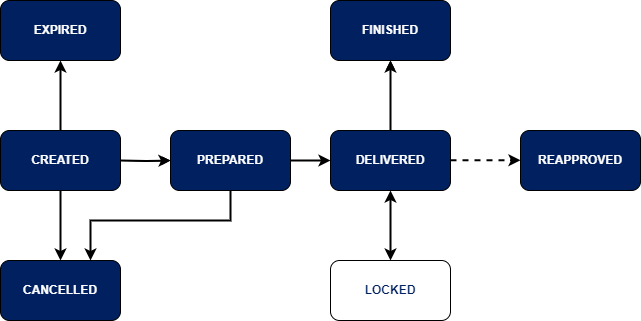
4. Approval Statuses and Available Actions:
Statuses of approvals:
Statuses of an Approval:
Statuses of a Reapproval:
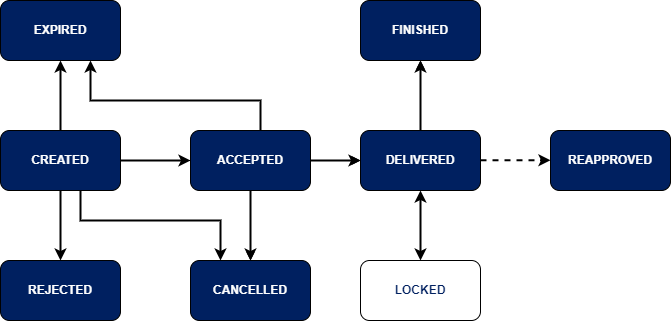
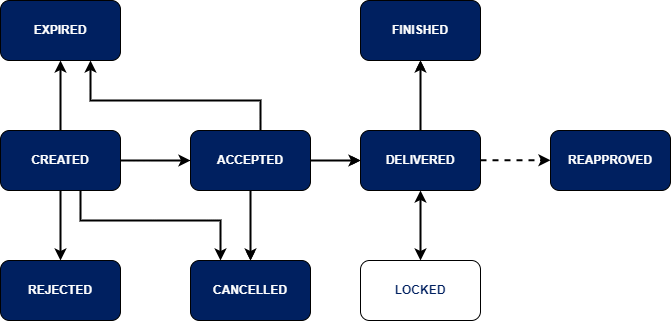
Actions available on approvals:
-
Created: Accept, Reject, Edit, Cancel.
-
Accepted: Cancel
-
Preprared: Cancel
-
Delivered: Lock, Unassign, Edit
-
Locked: Unlock
-
Rejected: —
-
Expired: —
-
Finished: —
Important! Reapproval Acceptance:
-
When a reapproval is accepted, its status changes to "Delivered."
-
The accepted reapproval replaces the previous approval. Therefore, it's crucial to save the ID of the accepted reapproval because, from that moment, it becomes the valid ID of this approval.
-
Concurrently, the status of the original approval changes to "Reapproved."
Unassign card from enduser
If the user has already redeemed the card (status of approval is Delivered), use the PUT /secure/approvals/{id}/unassign method to take away the card from the end-user.
If the user hasn't redeemed the card yet (status of approval is Accepted or Prepared), use the PUT /secure/approvals/{id}/cancel method to take away the card.
Increase or decrease available limit on a card
To quickly increase the available limit on a card, use the PUT /secure/approvals/{id}/increase_budget method.
To add another 10 EUR to the available limit, put the value: "additionalBudgetMinor": 1000 (assuming the minor currency is used with 1 EUR = 100 minor).
To quickly decrease the available limit on a card, use the same method PUT /secure/approvals/{id}/increase_budget but with a negative value.
To subtract 10 EUR from the available limit, put the value: "additionalBudgetMinor": -1000.
4. System Email Notifications
E-mails can be adjusted to your corporation and sent in different language. Contact Sparados for details.
4. Sparados Transaction API
Description
Sparados Transaction History API consists of inbound and outbound APIs(Outbound API is only tagged because OAS version which is used in this document is elder than OAS 3.1 in which webhooks was introduced)
Inbound Authentication
This API requires Mutual TLS authentication. You can use the same certificate for all mTLS-secured APIs exposed by Sparados. If you don't have one, follow this instruction: Connecting to server-to-server APIs
Outbound Authentication
During outbound call, server will present own certificate which is signed by Verestro (technology provider) CA and will proof possession of the private key during TLS handshake. Client can put configuration to trust all certificates signed by given CA. Every environment has own CA certificate and client has to use corresponding to environment root CA certificate
Backward compatibility
Any additional development in service will be backward compatible. Changes below are considered to be backward compatible, and client should not brake if any change will appear in future:
-
adding a new endpoint.
-
adding a new, optional, request parameter to an existing endpoint. The parameter can be added as part of the request body, as a URL parameter, or an HTTP header
-
adding a new enum value. The value is added either in the request or in the response.
-
relaxing some of the constraints on an existing request parameter. For example, making it optional
-
adding a new response parameter to the API response
Summing up: Client should ignore any unknown fields or enum values received as part of API responses
Outbound Retry Strategy
Outbound calls that fail with a timeout, connection failure, or an HTTP response code of 5xx, server will automatically retry 3 times with up to a 5-second wait between each try. If the call has not succeeded after the initial retries server will attempt a second round of 3 retries with increasing time intervals between each retry. Between attempts the system will wait 15 minutes, 30 minutes, and then 2 hours. If client server will not respond and retries are exhausted then call is dismissed
Transaction API
Cards API Swagger Documentation
@swagger="https://sparados-bc-api.upaidtest.pl/api-secure.yaml"